
แอปแบบฝังและ App Bridge
เปิดแอปในหน้าจัดการร้าน คุยกับหน้าจัดการร้านด้วย App Bridge และยืนยันทุกคำขอด้วย session token
แอปแบบฝัง (embedded app) เปิดในหน้าจัดการร้านใต้เมนู Apps ภายในเฟรมที่โหลด App URL ของคุณ หน้าของคุณคุยกับหน้าจัดการร้านผ่าน App Bridge ซึ่งเป็นโปรโตคอลข้อความผ่าน postMessage และพิสูจน์ว่าใครกำลังใช้งานด้วย session token อายุสั้น
เปิดใช้ได้ที่ Configuration หัวข้อ Open inside the store admin (แอปใหม่เปิดไว้แล้ว)
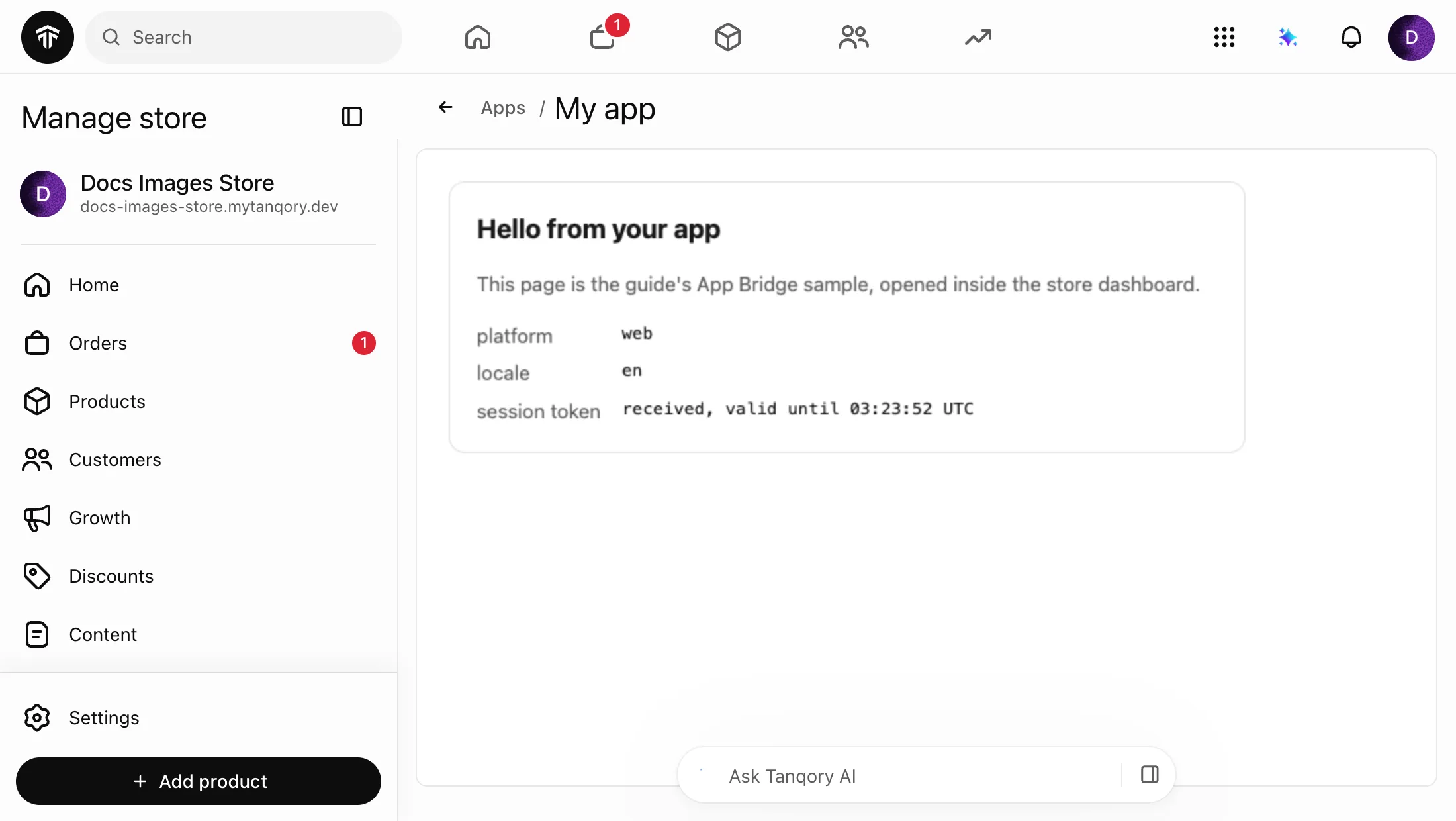
- หน้าจัดการร้าน → Tanqory API ขอเปิดแอปของคุณ (ร้านค้าเปิดจากเมนู Apps)
- Tanqory API → หน้าจัดการร้าน App URL และ session token แรก (ES256, 60 วินาที)
- หน้าจัดการร้าน → หน้าแอปของคุณ (ใน frame) ใส่ App URL ใน frame พร้อม store, host, locale, embedded, id_token
- หน้าแอปของคุณ (ใน frame) → หน้าจัดการร้าน App Bridge: ready
- หน้าจัดการร้าน → หน้าแอปของคุณ (ใน frame) platform, storeId, locale, features
- หน้าแอปของคุณ (ใน frame) → หน้าจัดการร้าน App Bridge: sessionToken.get
- หน้าจัดการร้าน → Tanqory API ขอ session token ใหม่
- หน้าจัดการร้าน → หน้าแอปของคุณ (ใน frame) token, expiresAt
- หน้าแอปของคุณ (ใน frame) → เซิร์ฟเวอร์ของแอปคุณ คำขอของคุณ พร้อม Authorization: Bearer <session token>
- เซิร์ฟเวอร์ของแอปคุณ → Tanqory API GET /apps/session-keys.json (เก็บไว้ 5 นาที)
- เซิร์ฟเวอร์ของแอปคุณ ตรวจลายเซ็น issuer, audience และเวลาหมดอายุ ถ้าไม่ผ่าน: 401
- เซิร์ฟเวอร์ของแอปคุณ → Tanqory API Token exchange ครั้งเดียวต่อร้าน
- Tanqory API → เซิร์ฟเวอร์ของแอปคุณ Offline access token ของร้าน
สิ่งที่เฟรมได้รับ
หน้าจัดการร้านโหลด App URL ของคุณพร้อมพารามิเตอร์เหล่านี้
| พารามิเตอร์ | ค่า |
|---|---|
store | store id |
host | base64url ของที่อยู่หน้าจัดการร้านที่ฝังคุณอยู่ เช่น https://admin.tanqory.com/admin/store/<store id> |
locale | ภาษาของผู้ใช้ เช่น en หรือ th |
embedded | 1 |
id_token | session token ให้เซิร์ฟเวอร์ของคุณเชื่อถือการโหลดหน้าแรกได้ |
ทุกหน้าของแอปต้องยอมให้เฉพาะหน้าจัดการร้านฝังได้
Content-Security-Policy: frame-ancestors https://admin.tanqory.comคุยกับหน้าจัดการร้าน
ข้อความ App Bridge เป็น JSON ที่มี protocol: "tanqory-app-bridge" และ version: 1 คำขอมี id, type และ payload หน้าจัดการร้านตอบครั้งเดียว โดย replyTo เป็น id นั้น พร้อม ok: true และ payload หรือ ok: false และ error โค้ดด้านล่างไม่ต้องใช้ไลบรารี ให้โหลดเป็น module (<script type="module">)
// App Bridge, protocol version 1, with no library: the page runs inside the dashboard's frame.
const PROTOCOL = 'tanqory-app-bridge';
const DASHBOARDS = ['https://admin.tanqory.com'];
const params = new URLSearchParams(location.search);
const host = atob(params.get('host').replace(/-/g, '+').replace(/_/g, '/'));
const hostOrigin = new URL(host).origin;
if (!DASHBOARDS.includes(hostOrigin)) throw new Error('Not opened by the Tanqory dashboard');

const pending = new Map();
let seq = 0;
function bridge(type, payload = {}) {
  return new Promise((resolve, reject) => {
    const id = `r${++seq}`;
    pending.set(id, { resolve, reject });
    window.parent.postMessage({ protocol: PROTOCOL, version: 1, kind: 'request', id, type, payload }, hostOrigin);
  });
}
window.addEventListener('message', (event) => {
  if (event.source !== window.parent || event.origin !== hostOrigin) return;
  const m = event.data;
  if (!m || m.protocol !== PROTOCOL || m.kind !== 'response') return;
  const call = pending.get(m.replyTo);
  if (!call) return;
  pending.delete(m.replyTo);
  if (m.ok) call.resolve(m.payload);
  else call.reject(new Error(m.error?.message ?? 'App Bridge error'));
});

const info = await bridge('ready', { clientVersion: 'my-app-1.0' });
await bridge('titleBar.set', { title: 'My app' });
const { token } = await bridge('sessionToken.get');
// Send the token to your server with each request: Authorization: Bearer <token>
ready ตอบกลับด้วยเวอร์ชันโปรโตคอล platform (web) storeId locale และ features ที่หน้าจัดการร้านรองรับ
| คำขอ | Payload | ทำอะไร |
|---|---|---|
ready | { clientVersion } | เริ่มการสื่อสาร ส่งเป็นอย่างแรก |
sessionToken.get | {} | คืน { token, expiresAt } session token ใหม่ |
titleBar.set | { title, breadcrumb?, primaryAction?, secondaryActions? } | ตั้งหัวหน้าของหน้าจัดการร้านเหนือเฟรม |
toast.show | { message, isError?, durationMs? } | แสดงข้อความสั้น |
modal.open | { title, message, primaryAction?, secondaryAction? } | ถามร้านค้า และตอบว่ากดปุ่มใด |
loading.set | { loading } | แสดงหรือซ่อนแถบโหลดของหน้าจัดการร้าน |
navigation.update | { path, replace? } | เลื่อนที่อยู่ของหน้าจัดการร้านตามหน้าของคุณ |
redirect.admin | { path, newContext? } | เปิดหน้าหนึ่งของหน้าจัดการร้าน |
redirect.remote | { url, newContext? } | ออกจากหน้าจัดการร้านไปยังที่อยู่ https |
resourcePicker.open | { resourceType, multiple?, query? } | ให้ร้านค้าเลือกสินค้า คอลเลกชัน หรือลูกค้าที่ scope ของคุณอ่านได้ |
context.get | {} | สกุลเงินและเขตเวลาของร้าน และโทนสีของหน้าจัดการร้าน |
saveBar.show, saveBar.hide | { saving? }, {} | แถบบันทึกของหน้าจัดการร้าน ขณะที่ฟอร์มของคุณมีการเปลี่ยนแปลงที่ยังไม่บันทึก |
scanner.capture | { formats?, prompt? } | บาร์โค้ดหรือ QR code |
files.pick | { accept?, multiple?, source? } | ไฟล์ที่ร้านค้าเลือก อัปโหลดเข้าพื้นที่พักไฟล์ของร้านแล้ว |
print.open | { path? } | พิมพ์หน้าหนึ่งของแอปคุณ |
ห้าคำขอหลังเป็นความสามารถของโฮสต์ ดูสิ่งที่แต่ละคำขอตอบ คุณสมบัติของอุปกรณ์ที่ต้องประกาศ และที่ที่ใช้ได้ใน ความสามารถของโฮสต์
เฟรมเปลี่ยนหน้าทั้งแท็บ เปิดกล่องโต้ตอบของเบราว์เซอร์ หรือพิมพ์เองไม่ได้ ให้ใช้ redirect.remote, modal.open และ print.open แทน
ตรวจ session token บนเซิร์ฟเวอร์
session token คือ JWT ที่ลงนามด้วย ES256 และใช้ได้ 60 วินาที claims บอกว่าคำขอนี้เป็นของร้านใด (store_id) และผู้ใช้คนใด (sub) token นี้ไม่ใช่ access token ใช้พิสูจน์ได้เพียงว่าใครกำลังใช้หน้าของคุณ ให้ตรวจทุกคำขอ
// Verifies an App Bridge session token on your server. Node.js 18 or later.
import { createPublicKey, verify } from 'node:crypto';

const API = 'https://api.tanqory.com';
const CLIENT_ID = process.env.TANQORY_CLIENT_ID;

export async function verifySessionToken(jwt) {
  const [h, c, s] = jwt.split('.');
  const header = JSON.parse(Buffer.from(h, 'base64url'));
  const claims = JSON.parse(Buffer.from(c, 'base64url'));
  if (header.alg !== 'ES256' || header.typ !== 'tanqory-app-session+jwt') throw new Error('not a session token');
  const { keys } = await (await fetch(`${API}/apps/session-keys.json`)).json(); // cache this for 5 minutes
  const jwk = keys.find((k) => k.kid === header.kid);
  if (!jwk) throw new Error('unknown key');
  const key = createPublicKey({ key: jwk, format: 'jwk' });
  const ok = verify('sha256', Buffer.from(`${h}.${c}`), { key, dsaEncoding: 'ieee-p1363' }, Buffer.from(s, 'base64url'));
  const now = Date.now() / 1000;
  if (!ok) throw new Error('bad signature');
  if (claims.iss !== API || claims.aud !== CLIENT_ID) throw new Error('wrong issuer or audience');
  if (claims.exp < now - 5 || (claims.nbf && claims.nbf > now + 5)) throw new Error('expired');
  return claims; // store_id, sub (the member), dest
}
รับ access token โดยไม่ต้อง redirect
เมื่อร้านค้าเปิดแอปแบบฝัง ให้นำ session token ไปแลกเป็น access token ของร้านเพียงครั้งเดียวแล้วเก็บไว้ วิธีนี้ใช้ได้กับแอปที่ร้านค้าติดตั้งจากหน้าจัดการร้าน โดยไม่ต้องมี redirect URL
curl -X POST "https://api.tanqory.com/v1/stores/$STORE_ID/apps/oauth/token" \
  --data-urlencode "client_id=$TANQORY_CLIENT_ID" \
  --data-urlencode "client_secret=$TANQORY_CLIENT_SECRET" \
  --data-urlencode "grant_type=urn:ietf:params:oauth:grant-type:token-exchange" \
  --data-urlencode "subject_token=$SESSION_TOKEN" \
  --data-urlencode "subject_token_type=urn:ietf:params:oauth:token-type:id_token" \
  --data-urlencode "requested_token_type=urn:tanqory:params:oauth:token-type:offline-access-token"
คำตอบมี access_token, token_type (Bearer), issued_token_type, scope และ store_id ใช้งานเหมือนใน เรียก API ครั้งแรก
เมื่อแอปของคุณโหลดไม่ขึ้น
ก่อนแสดงเฟรม หน้าจัดการร้านจะตรวจจากเบราว์เซอร์ของร้านค้าเองว่า App URL ของคุณตอบกลับหรือไม่
- เซิร์ฟเวอร์ของคุณไม่ตอบเลย (ไม่มีชื่อโฮสต์นี้แล้ว การเชื่อมต่อถูกปฏิเสธ หรือไม่ตอบภายใน 15 วินาที) ร้านค้าจะเห็น "ติดต่อ <ชื่อแอป> ไม่ได้" พร้อมปุ่ม ลองอีกครั้ง แทนเฟรมของคุณ
- เซิร์ฟเวอร์ตอบ แต่หน้าเว็บยังไม่ส่ง App Bridge
readyภายใน 10 วินาที เฟรมยังแสดงอยู่ และมีข้อความ "<ชื่อแอป> ใช้เวลาโหลดนานกว่าปกติ" อยู่ด้านบน ให้ส่งreadyทันทีที่หน้าเว็บเริ่มทำงาน