
สร้างธีมด้วย AI: Baan Rim Nam
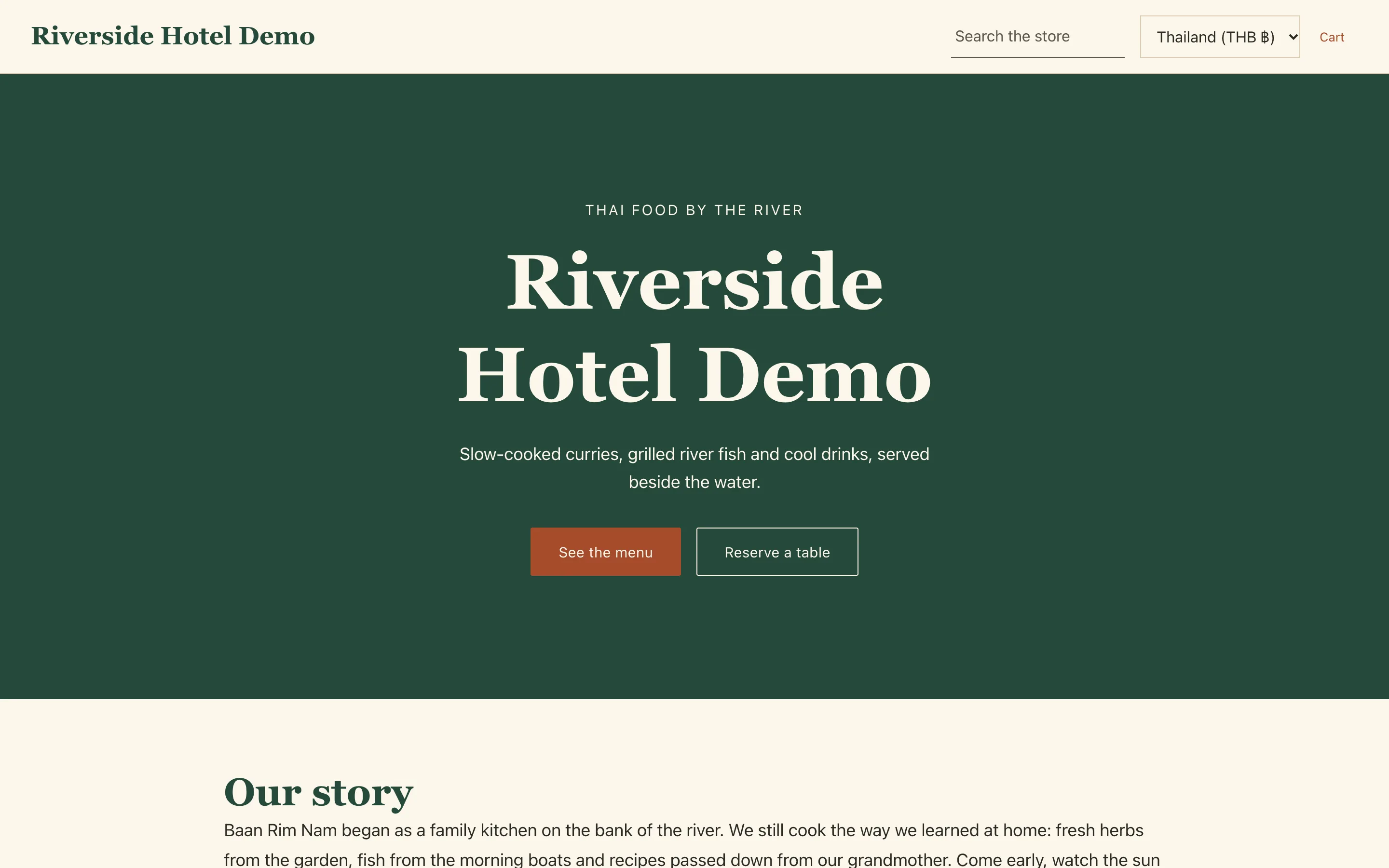
ธีมร้านอาหารที่สร้างด้วย Claude Code และ command line tanqory-partner ผ่านการตรวจใน sandbox ของ Tanqory 14 จาก 14 และส่งตรวจแล้ว ทุกขั้นในหน้านี้รันจริงบนสภาพแวดล้อมทดสอบของ Tanqory
หน้านี้สร้าง Baan Rim Nam ธีมสำหรับร้านอาหารและคาเฟ่ แล้วส่งเข้าการตรวจของ Theme Store สร้างบนสภาพแวดล้อมทดสอบของ Tanqoryเมื่อ 2026-11-15 ด้วย Claude Code และ prompt ชุดเดียว ธีมคือโค้ดของหน้าเว็บร้าน AI เป็นคนเขียน และ command line tanqory-partner ตรวจแบบเดียวกับที่ Tanqory ตรวจก่อนธีมจะไปถึงร้านใด
prompt เขียนเป็นภาษาอังกฤษเพราะเป็นชุดที่เราใช้จริง คุณสั่งเป็นภาษาไทยก็ได้
สิ่งที่ร้านอาหารได้:
- หน้าแรกที่ต้อนรับด้วยภาพใหญ่ ปุ่ม See the menu และ Reserve a table เรื่องราว เวลาเปิด และลิงก์แผนที่
- เมนูที่อ่านเหมือนเมนูพิมพ์: สินค้าของร้านจัดกลุ่มตามคอลเลกชัน (Starters, Mains, Desserts, Drinks) แต่ละจานมีคำอธิบายหนึ่งบรรทัดและราคา และยังมีหน้าของตัวเองสำหรับสั่งกลับบ้าน
- หน้าขอจองโต๊ะ ที่ทำจากฟอร์มติดต่อของร้าน
- สีสงบและหัวข้อแบบ serif ที่ร้านค้าเปลี่ยนได้ในค่าตั้งค่าของธีม
- คุณและ AI → tanqory-partner theme init: starter ที่ผ่านการตรวจทุกข้อ
- คุณและ AI AI แก้ src/, templates/, regions/ และ locales/
- คุณและ AI → tanqory-partner theme check: build และการตรวจ 8 ข้อที่รันในเครื่อง ถ้าไม่ผ่าน: แก้ทีละบรรทัด แล้วตรวจใหม่
- tanqory-partner → Sandbox ของ Tanqory theme push --store: เวอร์ชันใหม่
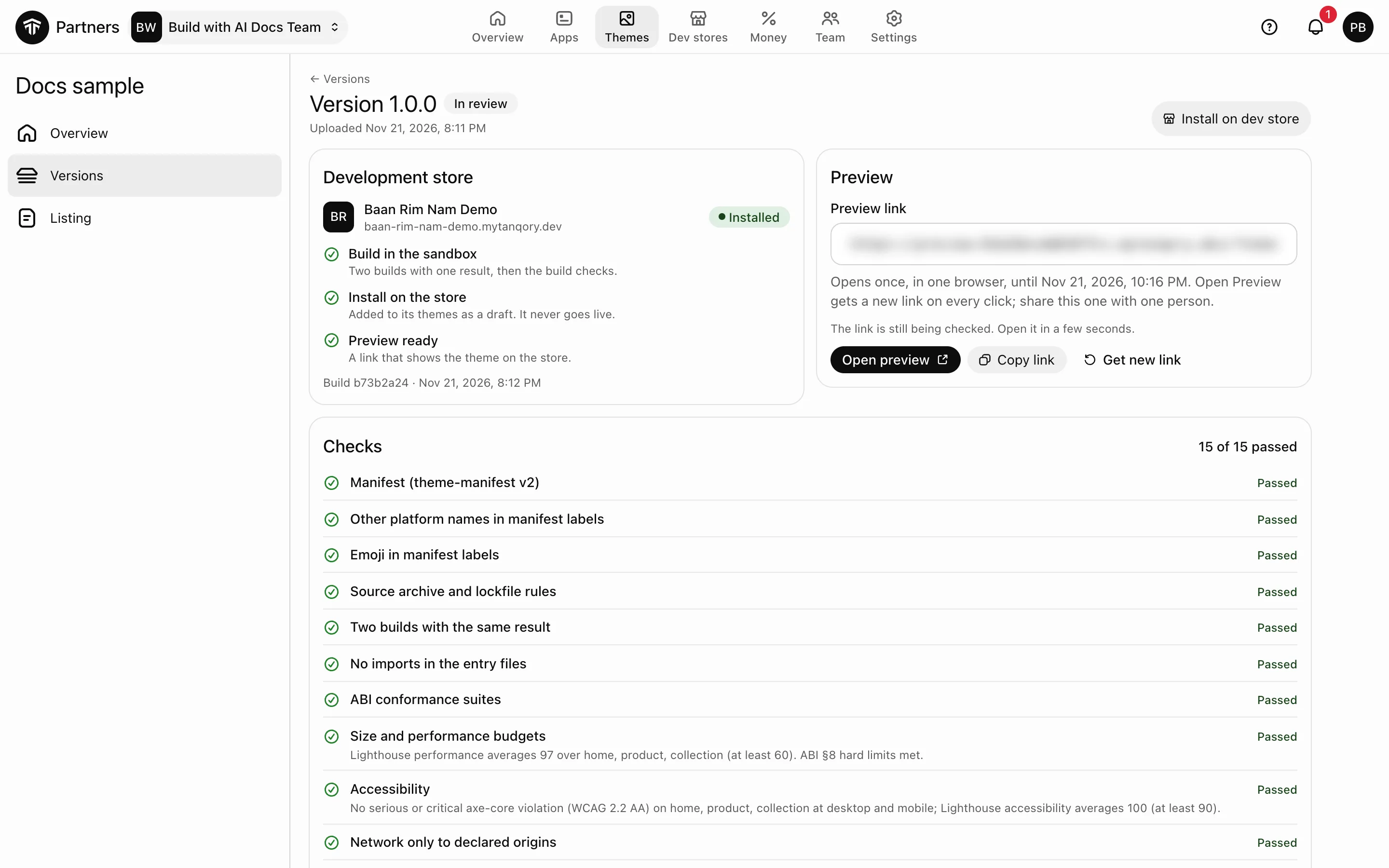
- Sandbox ของ Tanqory build สองครั้ง แล้วตรวจการเข้าถึง ความเร็ว เครือข่าย ภาพตัวอย่าง รวม 15 ข้อ ถ้าไม่ผ่าน: บรรทัดที่ไม่ผ่านบอกไฟล์และกฎ
- Sandbox ของ Tanqory → ร้านทดสอบ ติดตั้งเป็นฉบับร่าง เผยแพร่บนร้านนั้นได้
- คุณและ AI → Sandbox ของ Tanqory Listing แล้ว Submit for review ที่เวอร์ชัน
ก่อนเริ่ม
- องค์กร partner และร้านทดสอบ: สร้างบัญชี partner, สร้างร้านทดสอบ การส่งตรวจต้องมีบทบาท Owner หรือ Admin
- Node.js 20.11 ขึ้นไป และ Claude Code (หรือ AI เขียนโค้ดอื่น)
- command line ที่เข้าสู่ระบบแล้ว: เชื่อมต่อเครื่องมือ AI, command line tanqory-partner
1. เริ่มจาก starter
tanqory-partner theme init baan-rim-nam --author "Your Name"
cd baan-rim-nam
npm install
tanqory-partner theme check
การตรวจจบด้วยบรรทัด passed เก้าบรรทัด และ All checks that run here passed. พร้อมรายการเจ็ดบรรทัดที่รันใน sandbox ของ Tanqory เท่านั้น เริ่มทุกการเปลี่ยนจากการตรวจที่ผ่าน จะได้รู้เสมอว่าอะไรทำให้พัง
2. ให้ AI ออกแบบ
เปิด Claude Code ในโฟลเดอร์ธีมแล้วส่ง prompt นี้
This folder is a Tanqory partner theme made with `tanqory-partner theme init`. Turn it into a theme for restaurants, called "Baan Rim Nam" (a riverside Thai restaurant is the example). Read https://partners.tanqory.com/docs/themes first, then read the code in src/ before you change anything.

What a restaurant needs from its website:
- Home: a large photo with the restaurant's name and two buttons, "See the menu" and "Reserve a table"; a short story; opening hours; the address with a link to a map.
- Menu: the dishes are the store's products, grouped by collection (Starters, Mains, Desserts, Drinks). Show each dish as a row with its name, a one-line description and the price, like a printed menu, not as a shop grid. Keep "Add to cart" on a dish's own page so takeaway orders still work.
- Reserve a table: use the contact page. Change its words to a reservation request (name, phone, date, time, number of guests in the message).
- Calm and warm: cream background, deep green and terracotta accents, a serif for headings. No blue anywhere. Use the theme settings for colours and fonts so a merchant can change them.

Rules:
- Change only src/, templates/, regions/ and locales/. Do not change package.json, the build files or the bundler configs.
- The merchant must be able to change everything a shopper sees in the theme editor: every word, image and link in a section is a setting whose default is the real words, and every list (opening hours, guest quotes, menu groups) is blocks. Interface words such as button and form labels go in locales/en.json and locales/th.json (write the Thai too).
- Keep the page accessible: real headings in order, enough contrast, alt text, labels on inputs.
- When you are done, run `tanqory-partner theme check` and fix every line that fails, until it says all checks passed.
AI อ่านคู่มือ partner และ starter เขียนธีม และรันการตรวจเอง ใช้เวลาราวสี่นาที แล้วบอกสิ่งที่ทำไม่ได้: ฟอร์มติดต่อมีช่องตายตัว (ชื่อ อีเมล โทรศัพท์ ข้อความ) จึงให้ใส่รายละเอียดการจองในข้อความ และใช้ฟอนต์ของระบบที่มีฟอนต์ไทยสำรอง เพราะธีมโหลดฟอนต์จากที่อยู่อื่นไม่ได้
3. อัปโหลดและรันการตรวจทั้งหมด
tanqory-partner theme stores
tanqory-partner theme push --name "Baan Rim Nam" --version 1.0.0 --notes "First version" --store <development store id> --waitVersion 1.0.0 uploaded: <version id> (CHECKS_PASSED_STATIC) of theme baan-rim-nam in organization <organization id>.
Installing on development store <store id>: BUILDING.
[3:56:44 PM] CHECKS_PASSED_STATIC; 4 of 14 passed; BUILDING
[3:58:08 PM] CHECKING; 9 of 14 passed; INSTALLED
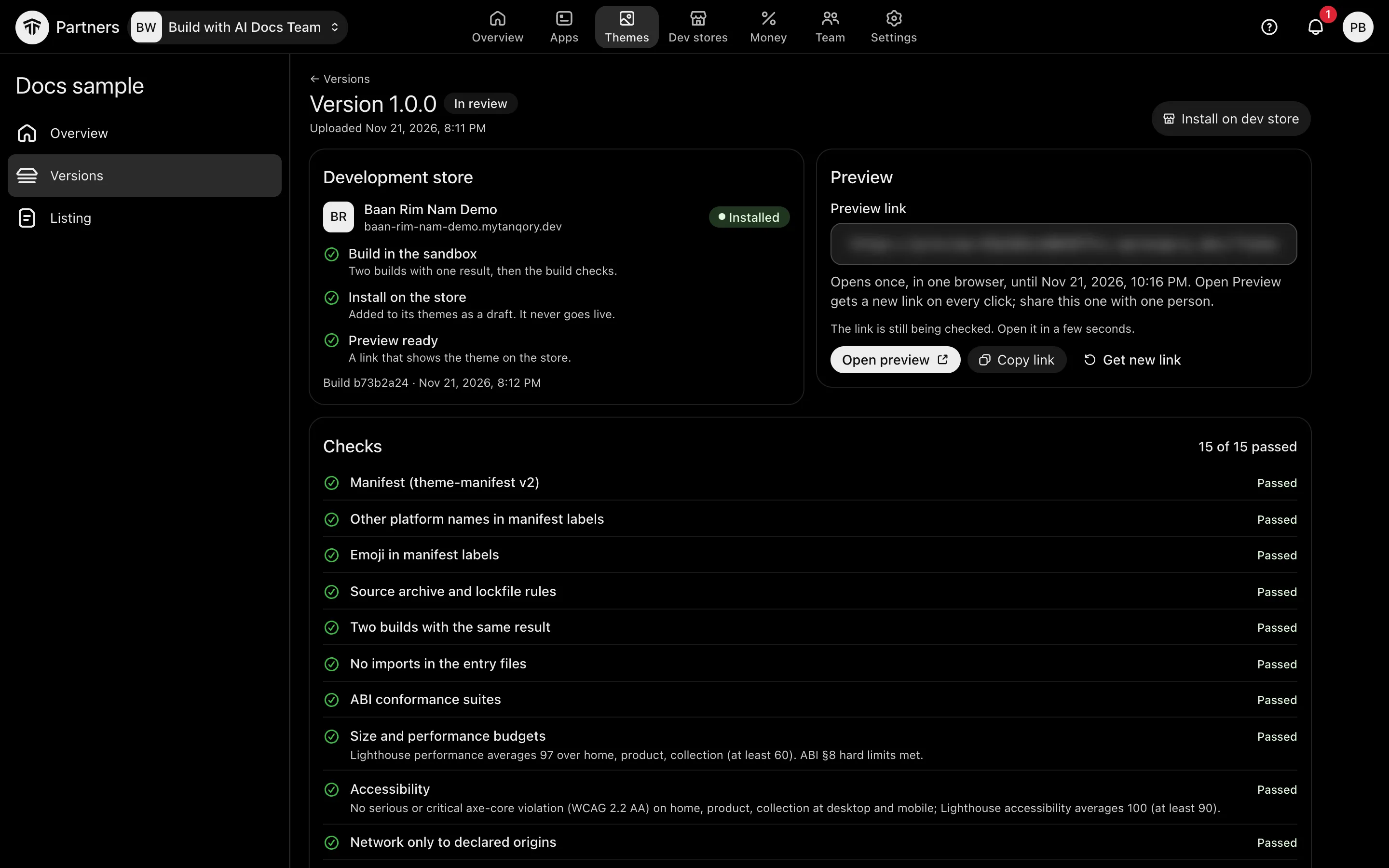
[3:59:03 PM] CHECKS_PASSED; 14 of 14 passed; INSTALLED
checks: 14 of 14 passed
passed budgets: Lighthouse performance averages 97.7 over home, product, collection (at least 60). ...
passed accessibility: No serious or critical axe-core violation (WCAG 2.2 AA) on home, product, collection at desktop and mobile; Lighthouse accessibility averages 100 (at least 90).
passed preview_renders: 27 route renders and 27 section previews on 3 sample stores, no render error; 18 screenshots saved.ทั้งหมดใช้เวลาราวสองนาทีครึ่ง บรรทัดที่ไม่ผ่านจะบอกไฟล์ กฎ และหลักฐาน ให้ส่งบรรทัดนั้นให้ AI ตามที่เห็นแล้วขอให้แก้ จากนั้น push เวอร์ชันใหม่ (--version 1.0.1)
4. ดูธีม
การ push จบด้วยลิงก์ preview ของฉบับร่างบนร้านทดสอบ ลิงก์เปิดได้ครั้งเดียว ในเบราว์เซอร์ที่เปิดก่อน ถ้าจะดูอีก ให้เลือก Open preview ที่เวอร์ชันใน partner dashboard (กดแต่ละครั้งได้ลิงก์ใหม่) หรือรัน tanqory-partner theme status <version id> ธีมจะขึ้นในหน้าจัดการร้านที่ Online Store แล้ว Themes เป็นฉบับร่างของนักพัฒนาด้วย เมนู Publish ของธีมนั้นจะเผยแพร่ธีมบนร้านทดสอบนั้น ซึ่งเป็นวิธีที่ร้านเดโมของ preset ใน listing แสดงธีม
แก้ไขในตัวแก้ไขธีม
เปิดฉบับร่างจากหน้าจัดการร้าน: Online Store แล้ว Themes แล้ว Edit theme ทุกอย่างที่แขกเห็นคือช่องหรือบล็อก และแต่ละช่องแสดงข้อความเดียวกับที่หน้าเว็บแสดง
- เลือกเซกชัน (Welcome, Our story, Opening hours, Find us, Words from guests) เพื่อเปลี่ยนข้อความ ลิงก์ และรูป รูปเลือกจากไฟล์ของร้าน
- รายการคือบล็อก ใต้ Opening hours แต่ละแถวเป็นบล็อก: Add block เพิ่มแถว ลูกศรบนหน้าเว็บย้ายแถว ถังขยะลบแถว คำรีวิวของแขกและกลุ่มเมนูก็ทำแบบเดียวกัน
- Theme เก็บสีไว้ เปลี่ยนแล้วทุกหน้าเปลี่ยนสีตาม
- เมนูแสดงอาหารที่เป็นสินค้าของร้าน เปลี่ยนชื่อหรือราคาใน Products แล้วเมนูเปลี่ยนตามทันที
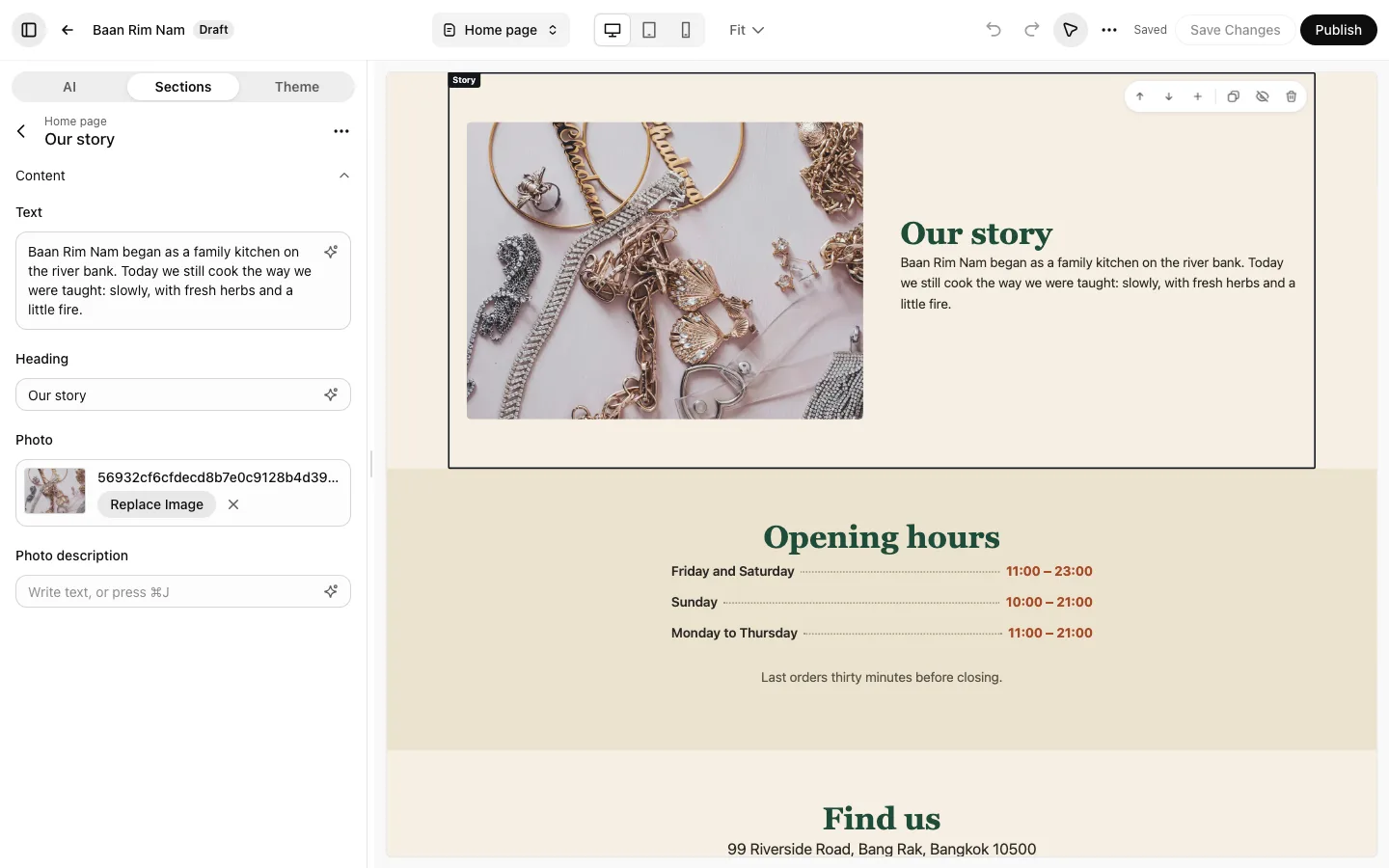
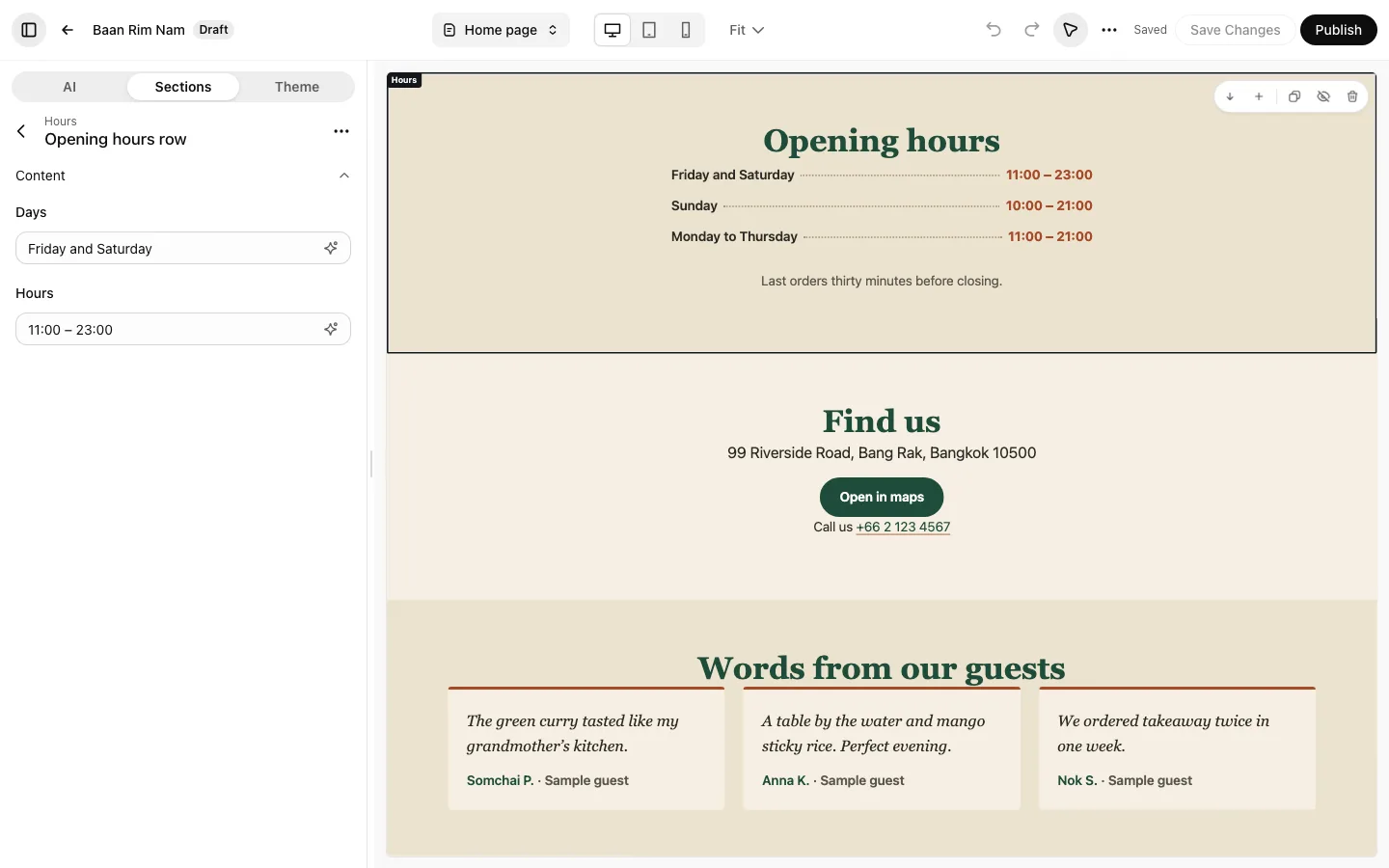
เมื่อ AI สร้างผ่าน Tanqory connector การ push จะถูกปฏิเสธทุกจุดที่ลูกค้าจะเห็นสิ่งที่ร้านค้าแก้ที่นี่ไม่ได้ พร้อมไฟล์ บรรทัด และวิธีแก้ AI จึงแก้ก่อนสร้างธีม สำหรับธีมของพาร์ทเนอร์ checkEditability ของ @tanqory/theme-standard ตรวจแบบเดียวกันในโฟลเดอร์ของคุณ
5. Listing และ Submit for review
- ใน partner dashboard เปิด Themes แล้ว Baan Rim Nam แล้ว Listing
- กรอก Listing name, Description (อย่างน้อย 20 ตัวอักษร: ธีมเหมาะกับใครและต่างอย่างไร) และ Features ได้สูงสุด 10 ข้อ
- ในหัวข้อ Screenshots เลือก Upload image (PNG, JPEG หรือ WebP ไม่เกิน 5 MB)
- เลือก Add preset: ใส่ Preset name และเลือก Demo store เป็นร้านทดสอบที่ติดตั้งเวอร์ชันไว้
- กรอก Support email และ Documentation (หน้า https ที่อธิบายธีม) เว้น Price ว่างถ้าธีมฟรี หรือตั้ง USD 1.00 ถึง 1000.00 แล้วเลือก Save listing
- เปิด Versions เลือกเวอร์ชัน แล้วเลือก Submit for review ยืนยัน Submit version 1.0.0 for review?
เวอร์ชันจะขึ้นว่า In review ผู้ตรวจของ Tanqory สองคนตัดสิน: คนหนึ่งตรวจ listing และการออกแบบ อีกคนตรวจความปลอดภัย (สิ่งที่ธีมทำได้ ที่อยู่ที่ธีมติดต่อ license และรายงานการตรวจ) ถ้าไม่ผ่านหนึ่งข้อจะถูกปฏิเสธพร้อมหมายเหตุ ผ่านทั้งสองข้อจึงอนุมัติ คู่มือ partner บอกว่าผลครั้งแรกจะออกภายใน 10 วันทำการ
สร้างให้ร้านตัวเองแทน
ร้านค้าที่ต้องการหน้าตาใหม่เฉพาะร้านตัวเองไม่ต้องผ่าน Theme Store เติมเนื้อหาร้านก่อน: ขอให้ connector สร้างทั้งร้าน (อาหาร คอลเลกชัน หน้าเพจ บล็อก นโยบาย เมนู ในการอนุมัติครั้งเดียว) เพื่อให้ออกแบบและตรวจธีมกับเนื้อหาจริง ด้วย Tanqory connector และ scope write_themes AI จะใช้ Advanced mode: theme_scaffold ให้ starter แบบเรียบ (ไม่เปลี่ยนอะไรในร้าน) theme_code_push พักไฟล์ของธีมทีละส่วน theme_code_commit build ธีมใหม่ใน sandbox เดียวกันหลังคุณอนุมัติ theme_build_status ติดตามการ build และ theme_preview_screenshot แสดงภาพหน้าจอ desktop และมือถือก่อนเผยแพร่ ร้านหนึ่งมีธีมแบบนี้ได้สูงสุด 5 ธีม และ build ได้ 10 ครั้งต่อชั่วโมง ถ้าจะทำธีมแบบนี้ต่อในเครื่องมือ AI อื่น ดู ทำธีมต่อในเครื่องมือ AI อื่น โหมดปกติที่ปรับธีมปัจจุบันผ่านค่าตั้งค่าและ section อยู่ใน Theme tools for AI assistants