
สร้างแอปด้วย AI: Room Booking
แอปจองห้องพักโรงแรมที่สร้างด้วย Claude Code จาก prompt ไม่กี่ชุด รันบน Appwrite ติดตั้งบนร้านทดสอบ และส่งตรวจแล้ว โดยกล่องจองเป็น app block รันบนสภาพแวดล้อมทดสอบของ Tanqory
หน้านี้สร้าง Room Booking แอปที่โรงแรมเล็กติดตั้งจากหน้าจัดการร้าน ทุกขั้นด้านล่างรันจริงบนสภาพแวดล้อมทดสอบของ Tanqoryเมื่อ 2026-11-15 ด้วย Claude Code และ prompt คือชุดเดียวกับที่ได้แอปที่ใช้งานได้จริง ใช้ prompt ห้าชุด (ตอนนี้เหลือสี่ ดูหมายเหตุด้านล่าง) และเวลาทำงานของ AI ไม่ถึงครึ่งชั่วโมง เวลาส่วนใหญ่ของคุณจะอยู่ที่การตั้งค่าและการลองใช้
prompt เขียนเป็นภาษาอังกฤษเพราะเป็นชุดที่เราใช้จริง คุณสั่งเป็นภาษาไทยก็ได้ ขอให้บอกครบเท่ากัน
สิ่งที่โรงแรมได้:
- ประเภทห้องและจำนวนห้อง ห้องแต่ละประเภทคือสินค้าหนึ่งรายการของร้าน (product type
Room) โรงแรมบอกว่ามีห้องแต่ละประเภทกี่ห้อง แอปจะไม่รับจองเมื่อประเภทนั้นเต็มในคืนใดคืนหนึ่ง - รายการจองรายการเดียว ในหน้าจัดการร้าน: การจองที่เพิ่มเอง การจองจากคำสั่งซื้อ และคำขอจากเว็บไซต์ที่โรงแรมกดยืนยันหรือปฏิเสธ
- กล่องจองในหน้าของห้องแต่ละประเภท เป็น app block ที่โรงแรมวางใต้รายละเอียดห้องในหน้าแก้ไขธีม: ใส่วันที่ ได้จำนวนห้องว่าง แล้วส่งคำขอจอง
- แพ็กเกจ Standard ราคา USD 19 ทุก 30 วัน ทดลองใช้ฟรี 14 วัน
- โรงแรม (หน้าจัดการร้าน) → Tanqory ติดตั้งแอป อนุมัติสิทธิ์และแพ็กเกจ
- Tanqory → Room Booking บน Appwrite access token สำหรับร้านนั้น
- โรงแรม (หน้าจัดการร้าน) → Room Booking บน Appwrite เปิดแอปในหน้าจัดการร้าน พร้อม session token
- Room Booking บน Appwrite → Tanqory อ่านสินค้าที่เป็นห้องผ่าน Admin API
- Tanqory → Room Booking บน Appwrite orders/create เมื่อคำสั่งซื้อมีห้องพัก
- แขก (เว็บของโรงแรม) → Tanqory ตรวจวันว่างในกล่องจองบนที่อยู่ของร้านเอง
- Tanqory → Room Booking บน Appwrite ส่งต่อผ่าน app proxy พร้อมลายเซ็น
ก่อนเริ่ม
- องค์กร partner และร้านทดสอบที่มีข้อมูลตัวอย่าง: สร้างบัญชี partner และ สร้างร้านทดสอบ
- Claude Code (หรือ AI เขียนโค้ดอื่น) ในเครื่องของคุณ และ Node.js 22
- โปรเจกต์ Appwrite สำหรับ server และข้อมูลของแอป Appwrite เป็น open source ใช้ Appwrite Cloud หรือ Appwrite ของคุณเองก็ได้ ทีมแอปของ Tanqory เองได้โปรเจกต์และที่อยู่
dev-<app>.tanqory.appจาก Tanqory ติดตั้ง command line ของ Appwrite ด้วยnpm install -g appwrite-cli - API key ของ Appwrite สำหรับการตั้งค่า ที่อ่านและเขียน databases, tables, columns และ indexes ได้
server ใดก็ได้ที่มีที่อยู่ https ใช้แบบเดียวกัน ต่างกันแค่ขั้นที่ 4
1. สร้างแอป
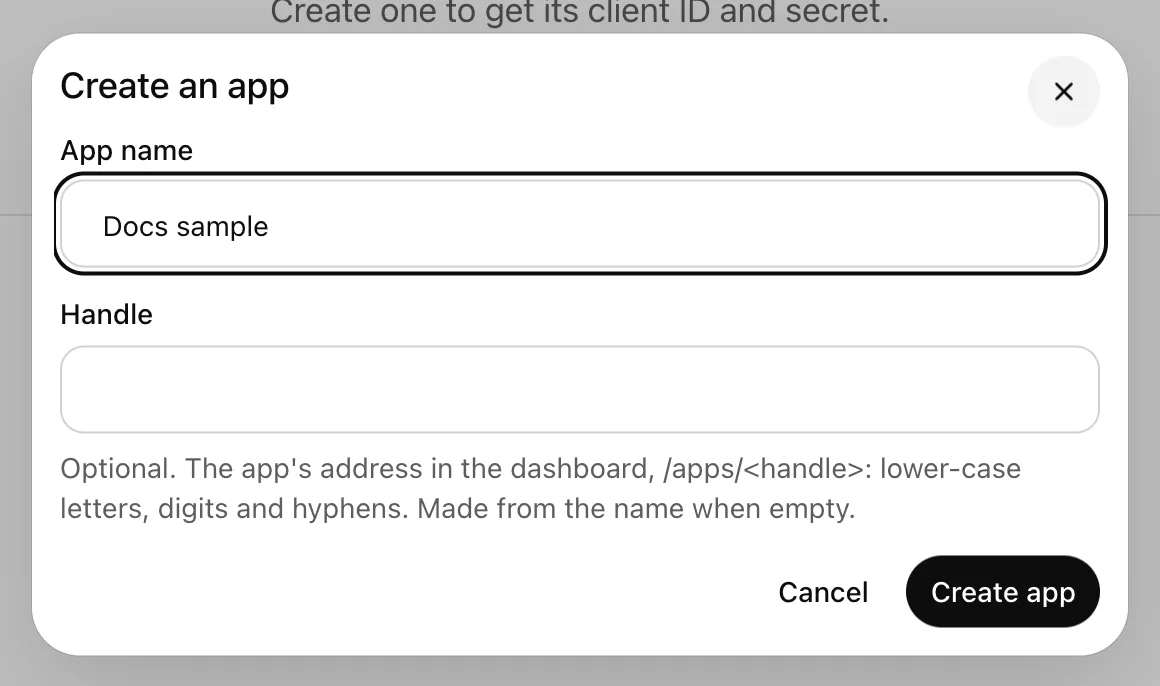
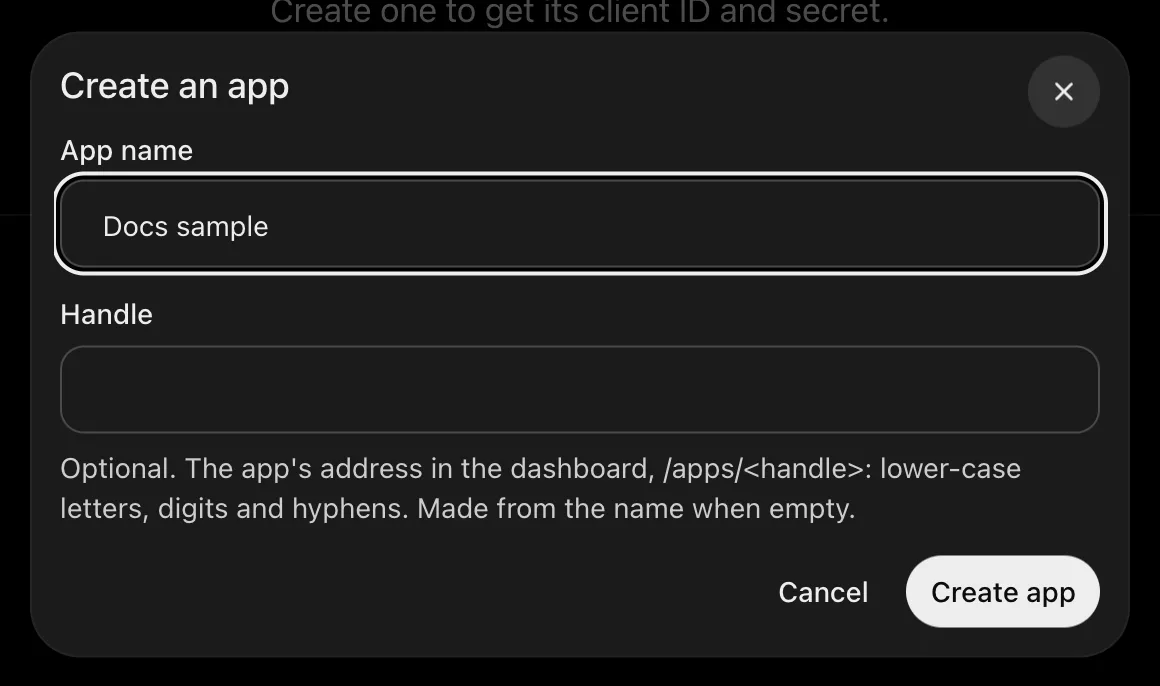
- ใน partner dashboard เปิด Apps แล้วเลือก Create app
- ใส่ App name
Room Bookingและ Handle เช่นriverside-room-bookingแล้วเลือก Create app - หน้าต่าง Save your client secret แสดง client ID และ client secret ครั้งเดียว เก็บ secret ไว้ในที่ปลอดภัย เช่น password manager แล้วเลือก I saved the secret
2. ให้ AI สร้าง
สร้างโฟลเดอร์ว่าง เปิด Claude Code ในโฟลเดอร์นั้น แล้วส่ง prompt แรก AI จะอ่านเอกสารนี้ก่อน แล้วเขียนแอป
Build me a Tanqory app called "Room Booking" for small hotels and guesthouses.

What it does:
- A hotel that sells on Tanqory installs it from its store dashboard. It opens inside the dashboard.
- Each room type is one of the store's products (read them with the Admin API). The hotel sets how many rooms of each type it has.
- The hotel sees a list of bookings (guest name, guest email, room type, check-in, check-out, status) and can add a booking by hand. The app refuses a booking when that room type is already full on any of the nights.
- When an order includes a room product, the app turns it into a booking. The dates are the line item's custom attributes "Check-in" and "Check-out" (YYYY-MM-DD). Use the orders/create webhook.

How to build it:
- One Appwrite Function, Node.js 22, no npm dependencies, ES modules, in ./function. Keep data in Appwrite TablesDB through its REST API with the function's API key. Every row carries the store id, and the app only reads rows of the store named in a verified session token or a verified webhook.
- Follow Tanqory's developer docs exactly. Read these pages before you write code:
  https://docs.tanqory.com/apps/
  https://docs.tanqory.com/apps/oauth/
  https://docs.tanqory.com/apps/embedded/
  https://docs.tanqory.com/apps/webhooks/
  https://docs.tanqory.com/apps/billing/
  https://docs.tanqory.com/get-started/first-api-call/
- Routes: /auth/start and /auth/callback (install with OAuth: state, PKCE, check the callback hmac), / (the embedded page: App Bridge, check the session token), /api/... (JSON for the page, a session token on every call), /webhooks (check the HMAC of the raw body), /webhooks/compliance (the three privacy topics; shop/redact deletes that store's rows), /privacy (a short privacy policy page), /healthz.
- Read secrets (client secret, Appwrite API key) only from environment variables. Never log tokens or guest details.
- Write appwrite.json for the Appwrite CLI (function id "app", runtime node-22, entrypoint src/main.js, execute "any"), and a script setup.mjs that creates the database and tables through the Appwrite REST API.
- Write README.md listing every environment variable.
Do not deploy anything. I will run it.
ราวหกนาทีต่อมาได้ไฟล์ด้านล่าง พร้อมรายการสิ่งที่ AI ต้องเดาเอง ซึ่งควรอ่าน: นั่นคือจุดที่ควรทดสอบก่อน
| ไฟล์ | ทำอะไร |
|---|---|
function/src/main.js | เส้นทางทั้งหมด: ติดตั้ง หน้าในแดชบอร์ด API ของหน้า webhook หน้านโยบายความเป็นส่วนตัว |
function/src/lib/tanqory.js | ตรวจ callback ตอนติดตั้ง session token และลายเซ็น webhook เรียก Admin API |
function/src/lib/bookings.js | จำนวนห้องและการจอง หนึ่งแถวต่อห้องต่อคืน การจองสองรายการจึงชนห้องเดียวกันไม่ได้ |
function/src/lib/webhooks.js | orders/create เป็นการจอง และหัวข้อด้านความเป็นส่วนตัว |
function/src/lib/pages.js | หน้าในแดชบอร์ด พร้อม App Bridge |
setup.mjs, appwrite.json, README.md | ตาราง ค่าของ function และค่าตั้งค่าทุกตัวที่ต้องใช้ |
3. เพิ่มแพ็กเกจและกล่องจอง
ส่ง prompt ที่สองในบทสนทนาเดิม (claude --continue จาก terminal)
Good. Now add these to the Room Booking app in this folder. Keep everything that already works.

1. Appwrite key: do not use an APPWRITE_API_KEY variable. Use the key Appwrite gives each execution in the x-appwrite-key request header, and list the scopes the function needs in appwrite.json ("scopes": rows.read, rows.write). setup.mjs still takes a key from the environment, because it runs on my computer.

2. Billing: the app has one plan, "Standard", USD 19 every 30 days with a 14-day free trial. Read https://docs.tanqory.com/apps/billing/ again. When the hotel opens the app and the store has no active subscription, show a short "Choose your plan" screen with a "Start free trial" button that creates the subscription and sends the merchant to the approval page at the top level (not inside the frame). After approval the merchant comes back to the app. On a development store use a test charge.

3. A booking form on the hotel's own website, as a Tanqory app block (read https://docs.tanqory.com/apps/app-blocks/ and https://docs.tanqory.com/apps/extensions/ first). Write blocks/booking.js (no libraries, under 20 KB) and blocks/booking.css. The script registers the block with window.tqAppBlocks.register('booking-box', { mount(root, settings) {...}, unmount(root) {...} }) and renders only inside root: never look up or change the theme's elements or forms. It takes the room's handle from the page address (/products/<handle>) and shows a "Check availability" box: check-in date, check-out date, a "Check availability" button. It calls the app proxy on the same site at /apps/rooms/availability?handle=<handle>&from=<date>&to=<date> and shows how many rooms are free. If rooms are free, it shows name and email fields and a "Request booking" button that POSTs JSON to /apps/rooms/request. The request is saved as a booking with status "requested", which the hotel confirms or declines in the dashboard (add Confirm and Decline buttons there). Style it only in booking.css, with a class of its own on every element (no <style> elements, no style attributes); use the store's own fonts and colours (inherit), and work on a phone. The block has no settings.
   On the server, add /proxy/availability and /proxy/request. Tanqory calls them through the app proxy with the query parameters shop, logged_in_customer_id, path_prefix, timestamp and signature. signature is the hex HMAC-SHA256, keyed with the client secret, of every other query parameter written as key=value (several values of one key joined by ","), sorted, and joined with nothing between them. Check it in constant time, refuse a timestamp older than 5 minutes, and find the store from the shop parameter (the store's domain saved at install). Answer JSON, and refuse a request for dates in the past, a stay longer than 30 nights, or a full room type.

4. README: add the app proxy settings (prefix "apps", subpath "rooms", proxy URL APP_URL/proxy) and the app block (name "Room booking box", handle booking-box, script blocks/booking.js, stylesheet blocks/booking.css, uploaded in the partner dashboard's Extensions) to the partner dashboard steps, and the billing plan to the listing.

Do not deploy. Check every file with node --check.
4. ขึ้น Appwrite
จากโฟลเดอร์ของแอป
# ตาราง (ครั้งเดียว)
APPWRITE_ENDPOINT=<your Appwrite endpoint>/v1 APPWRITE_PROJECT_ID=<project id> APPWRITE_API_KEY=<setup key> node setup.mjs

# function
appwrite client --endpoint <your Appwrite endpoint>/v1 --project-id <project id> --key <setup key>
appwrite push function --function-id app --force --config-file appwrite.json
setup.mjs จบด้วย Done. และการ push จบด้วย Successfully deployed 1 function จากนั้นใน Appwrite console:
Functions แล้ว app แล้ว Variables เพิ่มทีละตัว และตั้ง secret ให้เป็น secret
Variable ค่า TANQORY_CLIENT_IDclient ID จากขั้นที่ 1 TANQORY_CLIENT_SECRETclient secret จากขั้นที่ 1 (secret) APP_URLที่อยู่ของแอป เช่น https://dev-room-booking.tanqory.appAPP_HANDLEriverside-room-bookingAPP_SCOPESread_products,read_orders,write_app_proxyPRIVACY_CONTACTอีเมลที่ร้านค้าใช้ติดต่อเรื่องข้อมูลของตน Functions แล้ว app แล้ว Domains เพิ่มที่อยู่ของแอป
push function อีกครั้งเพื่อให้เริ่มทำงานพร้อม variable
รู้ว่าสำเร็จเมื่อ https://<app address>/healthz ตอบ ok
5. บอก Tanqory ว่าแอปอยู่ที่ไหน
ใน partner dashboard เปิดแอป แล้ว Configuration
| ช่อง | ค่า |
|---|---|
| App URL | https://<app address>/ |
| Open inside the store admin | เปิด |
| Redirect URLs | https://<app address>/auth/callback |
| Access scopes, Required | read_products, read_orders, write_app_proxy |
| Webhooks | topic orders/create endpoint https://<app address>/webhooks |
app/uninstalled | https://<app address>/webhooks |
customers/data_request, customers/redact, shop/redact | https://<app address>/webhooks/compliance |
| App proxy | เปิด Use an app proxy prefix apps subpath rooms proxy URL https://<app address>/proxy |
เลือก Save version จากนั้นเปิด Extensions เลือก Add app block แล้วใส่ ชื่อ Room booking box handle booking-box คำอธิบาย เช่น Dates and free rooms for this room ไฟล์ script blocks/booking.js และ stylesheet blocks/booking.css จากโฟลเดอร์ของแอป แล้วเลือก Upload and save block Tanqory เก็บทั้งสองไฟล์ไว้กับเวอร์ชัน และส่งจากที่อยู่ของร้านแต่ละร้านเอง ไฟล์ที่แก้แล้วอัปโหลดใหม่แบบเดียวกันและกลายเป็นเวอร์ชันถัดไป (ถ้าใช้ command line tanqory-partner คำสั่ง tanqory-partner app extensions push ทำแบบเดียวกันจากไฟล์ tanqory.extensions.json ดู App blocks)
6. ติดตั้งบนร้านทดสอบ
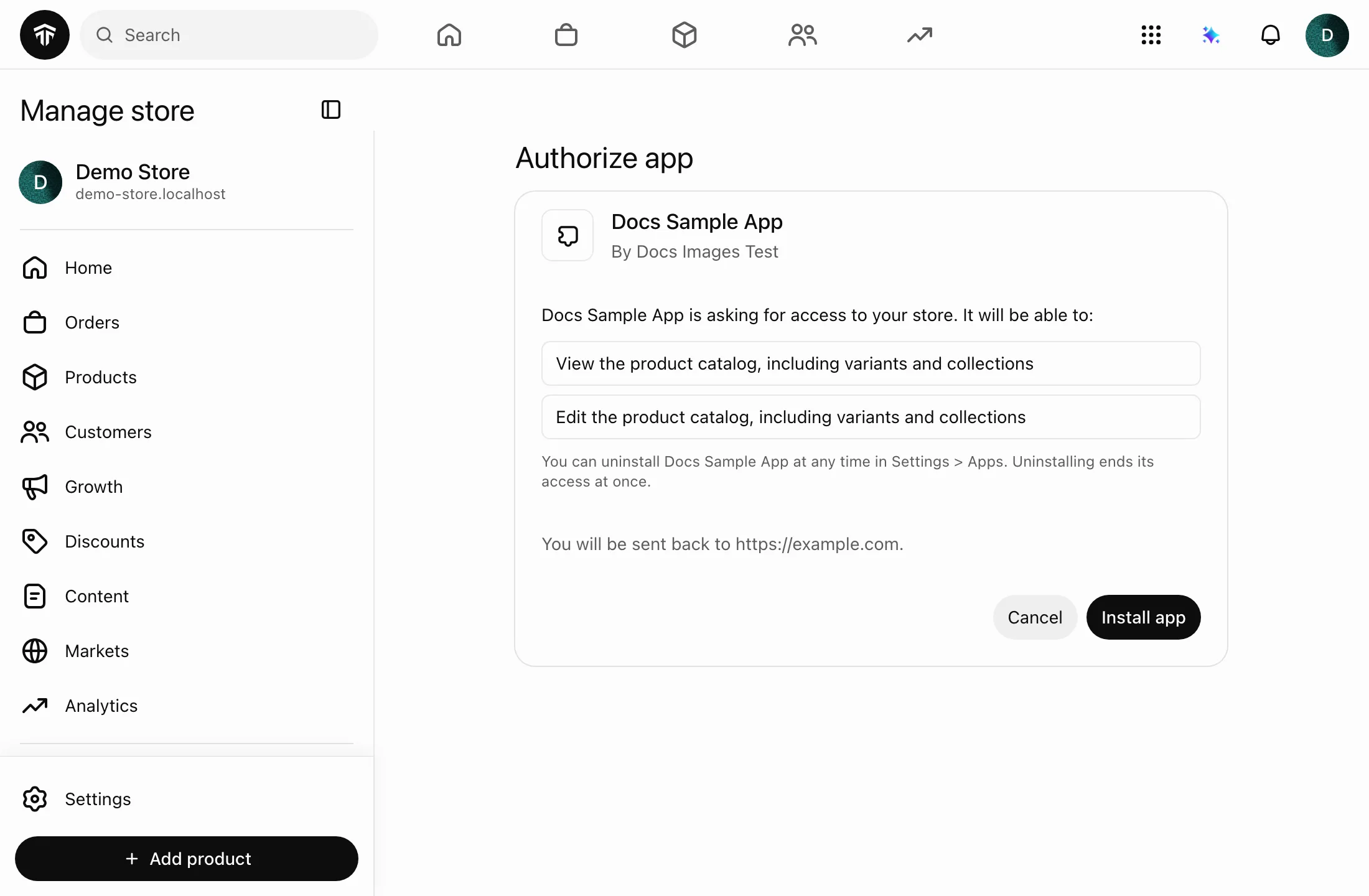
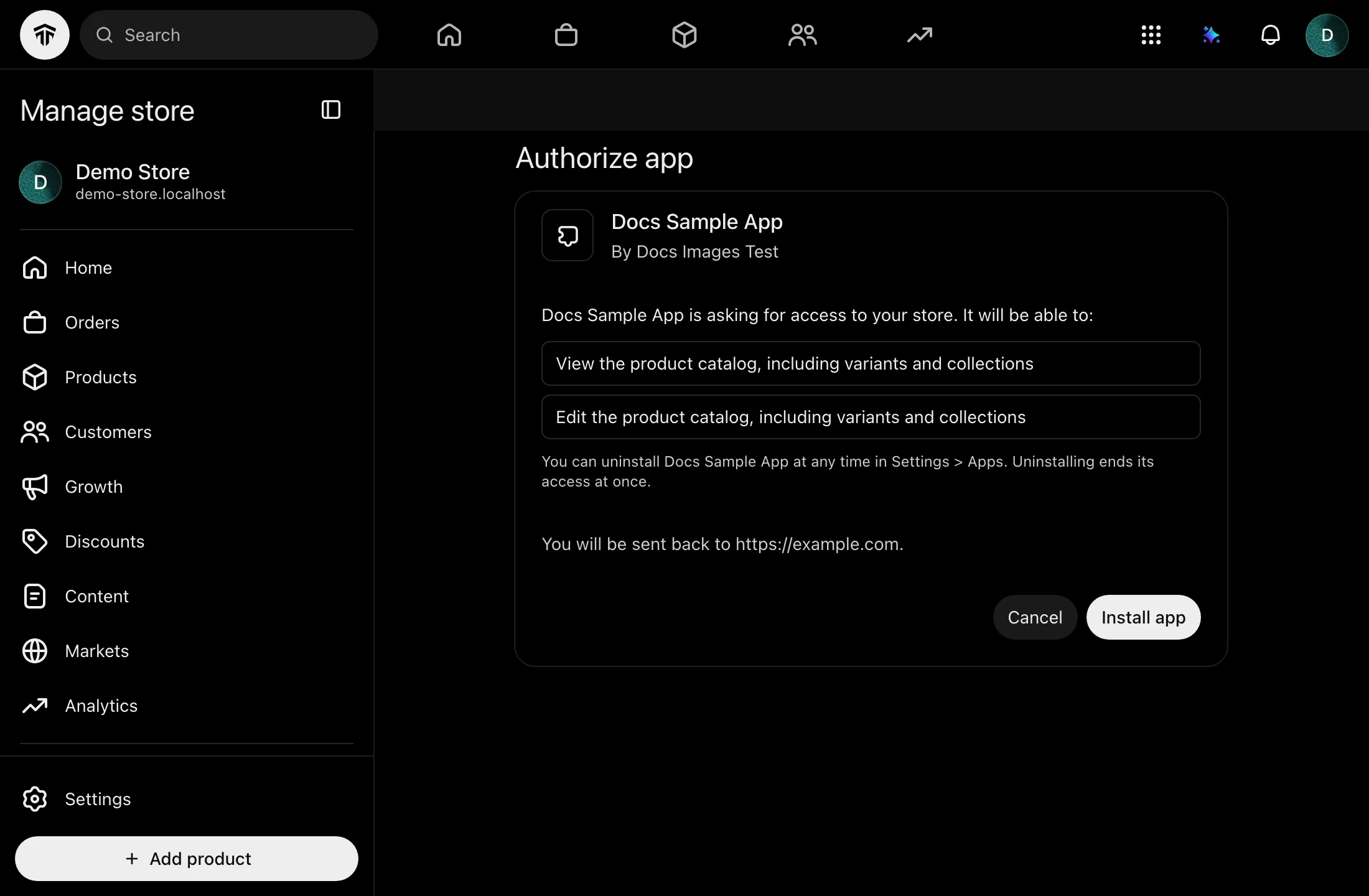
เปิด https://<app address>/auth/start?store_id=<development store id> (store id อยู่ในที่อยู่ของหน้าจัดการร้าน) หน้าจัดการร้านจะแสดง Authorize app พร้อมสิ่งที่แอปทำได้ เลือก Install app หน้าของแอปจะขึ้นว่า Room Booking is installed
แดชบอร์ดพาร์ทเนอร์ติดตั้งอีกแบบหนึ่ง: เปิด Home ของแอป แล้วเลือก Install ข้างร้าน นี่คือการติดตั้งแบบที่ App Store และผู้ตรวจของ Tanqory ใช้ ไม่มี OAuth callback และแอปได้ access token ด้วยการแลก token ตอนเปิดครั้งแรก จึงควรลองแบบนี้ด้วย: แอปต้องเปิดเข้า Choose your plan ทันที ไม่ใช่ "Finish the install to continue"
7. ใช้ในฐานะโรงแรม
- เปิด Apps แล้ว Room Booking ในหน้าจัดการร้าน แอปแสดง Choose your plan เลือก Start free trial
- หน้า Approve app charge แสดงแพ็กเกจ USD 19.00 ทุก 30 วัน ทดลองฟรี 14 วัน และบนร้านทดสอบจะขึ้น This is a test charge. You won't be billed. เลือก Approve charge แล้วจะกลับมาที่แอป
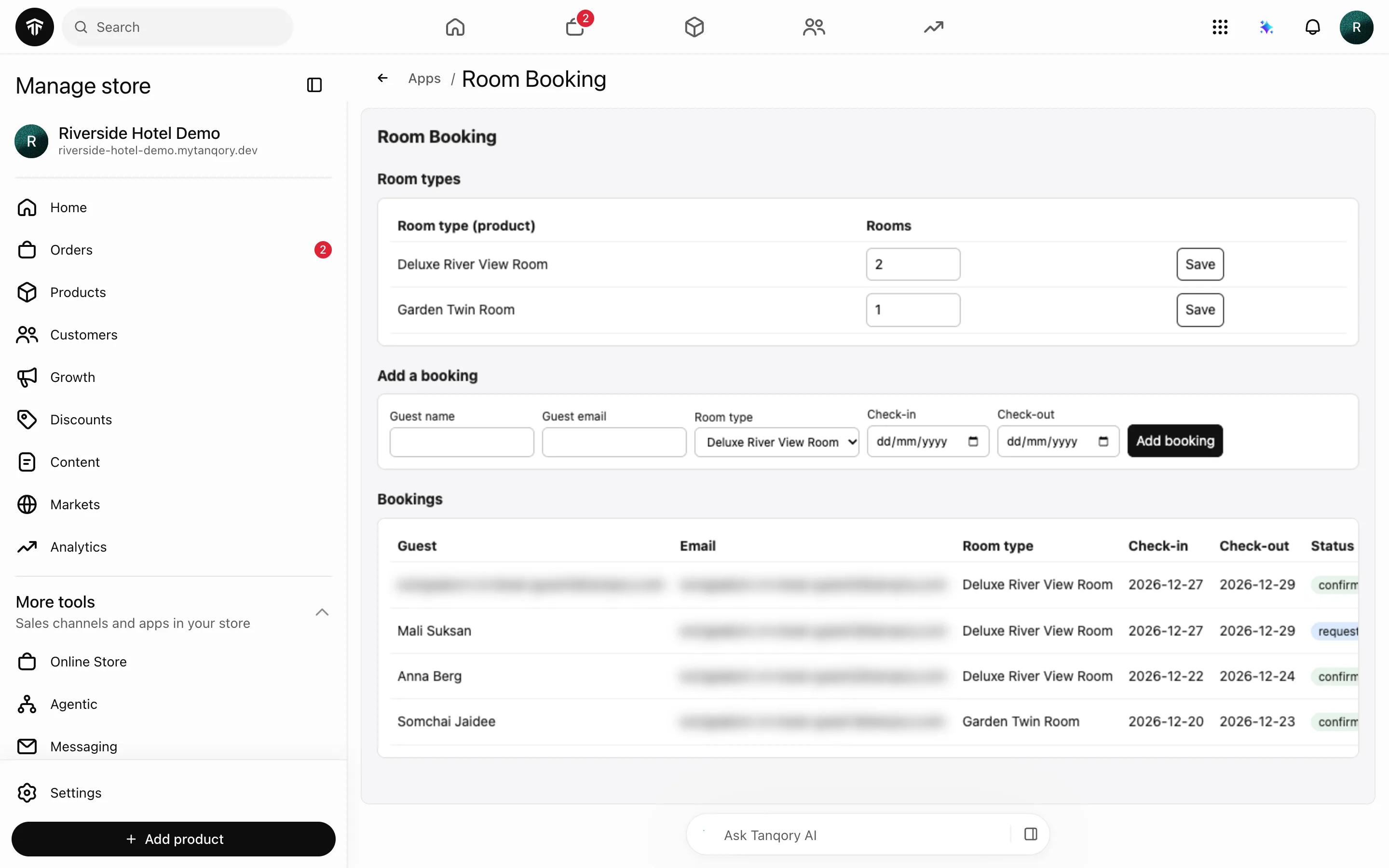
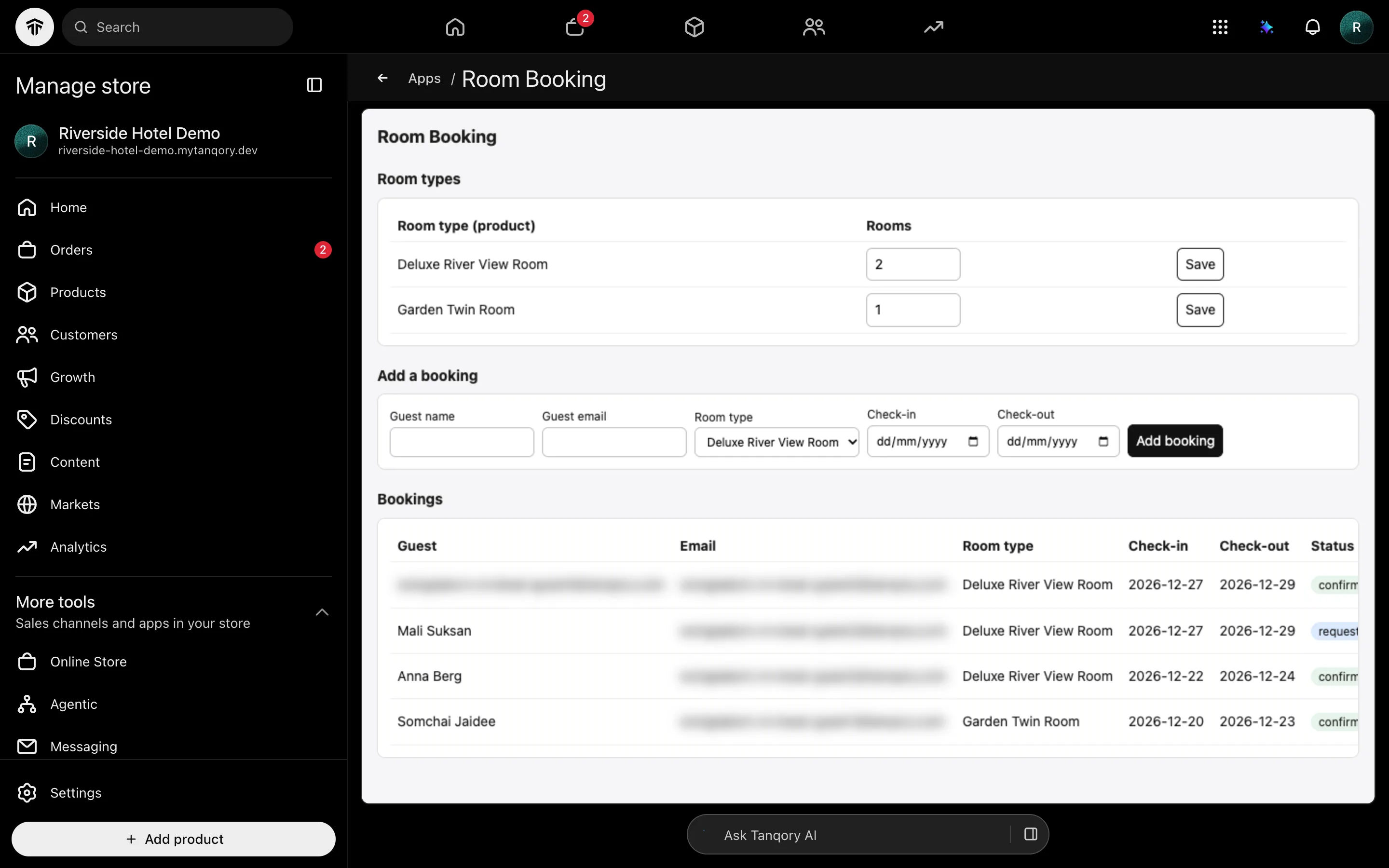
- เพิ่มสินค้าสองรายการที่มี product type
Room(เราใช้ "Deluxe River View Room" และ "Garden Twin Room") ตั้ง Rooms เป็น 2 และ 1 แล้วเลือก Save - เพิ่มการจองเอง แล้วเพิ่มอีกรายการของห้องประเภทเดียวกันในคืนที่ทับกัน แอปจะตอบ That room type is full on 2026-12-22
8. การจองจากคำสั่งซื้อ
สร้างคำสั่งซื้อห้องพักที่บรรทัดสินค้ามี custom attributes Check-in และ Check-out เป็น YYYY-MM-DD (เราสร้าง draft order แล้วปิดเป็นชำระแล้ว) Tanqory ส่ง orders/create ให้แอปภายในไม่กี่วินาที และการจองจะขึ้นในรายการ ใน partner dashboard หน้า Logs แสดงการส่งแต่ละครั้งและคำตอบของแอป
9. กล่องจองบนเว็บไซต์
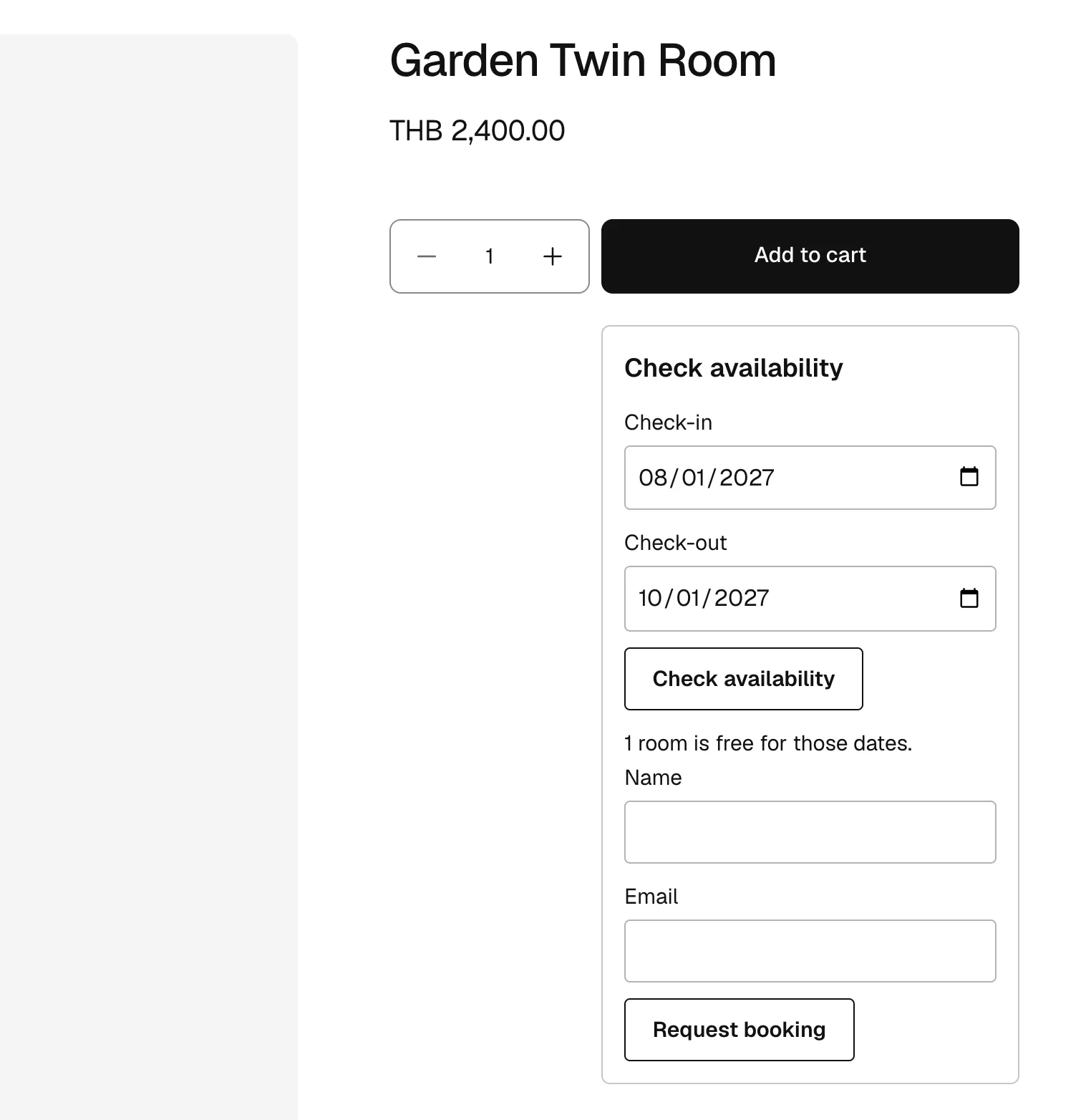
- ในหน้าจัดการร้าน เปิด Online Store แล้ว Themes เลือก Customize ที่ธีมที่ใช้อยู่ เปิดหน้าสินค้าของห้องพักในหน้าแก้ไข เลือก section รายละเอียดสินค้า แล้ว Add block แท็บ Apps และ Room booking box ย้ายไปวางตรงที่โรงแรมต้องการ เช่น ใต้ราคา แล้วบันทึก ธีมที่ใช้อยู่จะเห็นผลเมื่อบันทึก ส่วนฉบับร่างจะเห็นเมื่อเผยแพร่
- เปิดหน้าห้องพักบนร้าน กล่องจะถามวันที่ Check availability ตอบว่ามีห้องว่างกี่ห้อง แล้วถามชื่อและอีเมล
- Request booking บันทึกคำขอ ซึ่งจะขึ้นในแอปพร้อม Confirm และ Decline
- ที่อยู่ของร้าน → เบราว์เซอร์ของแขก หน้าห้องพัก พร้อม script และ stylesheet ของ block จอง
- เบราว์เซอร์ของแขก → ที่อยู่ของร้าน GET /apps/rooms/availability พร้อมวันที่
- ที่อยู่ของร้าน → Room Booking GET /proxy/availability เพิ่ม shop, timestamp และ signature
- Room Booking ตรวจลายเซ็นด้วย client secret และเวลาว่ายังใหม่ ถ้าไม่ผ่าน: ปฏิเสธ
- Room Booking → เบราว์เซอร์ของแขก จำนวนห้องว่าง ผ่านที่อยู่ของร้าน
กล่องคุยกับที่อยู่ของร้านเองเท่านั้น คือ /apps/rooms/... เพราะกฎความปลอดภัยของร้านไม่ให้ script บนหน้าร้านเรียกที่อยู่อื่น และ Tanqory ส่งต่อ path เหล่านั้นให้แอปพร้อมลายเซ็น
10. แก้สิ่งที่การทดสอบพบ
การทดสอบบนร้านพบสิ่งต่อไปนี้ prompt ด้านล่างแก้ครั้งละหนึ่งอย่างหรือมากกว่า ถ้า AI ของคุณพลาดแบบเดียวกัน ส่งไปได้เลย
I deployed it and tried it on my development store. Most of it works. Please fix these four things:

1. The booking box on the website gets the theme's "not found" page from /apps/rooms/... The app proxy only works when the store granted the write_app_proxy scope, and the install asks only for read_products,read_orders. Ask for every scope the app needs: read_products,read_orders,write_app_proxy. Read the scope list from an APP_SCOPES environment variable, with that value as the default.
2. After the merchant approves the plan, they land on the store's home page instead of the app. Send them back into the app: https://admin.tanqory.com/admin/store/<store id>/apps/<app handle>. The app handle comes from an APP_HANDLE environment variable.
3. The room list shows every product of the store (cushions, mugs...). Show only products whose product type is "Room".
4. A booking made from an order shows the guest's email as the name. Use the order customer's first and last name, or the billing address name, when the order has one.

Keep everything else. Do not deploy. Check every file with node --check.
การติดตั้งจากปุ่ม Install ในแดชบอร์ดพาร์ทเนอร์ (ขั้นที่ 6) ขึ้นว่า "Finish the install to continue" พร้อมลิงก์ Continue ที่กดแล้วไม่เกิดอะไร เพราะไม่มี OAuth callback แอปจึงไม่มี access token และเฟรมในหน้าจัดการร้านเปลี่ยนหน้าทั้งแท็บเองไม่ได้ prompt นี้แก้ได้ หลังแก้ ร้านทดสอบใหม่เปิดเข้า Choose your plan ทันที:
A hotel installed Room Booking from the store dashboard (the App store), not through /auth/start. When it opens the app inside the dashboard, the app shows "Finish the install to continue" and a Continue link that does nothing. No OAuth callback ran, so the app has no access token for that store, and the frame is not allowed to move the whole tab. Fix it the way https://docs.tanqory.com/apps/embedded/#get-an-access-token-without-a-redirect says (read that page and https://docs.tanqory.com/apps/oauth/#when-the-install-starts-in-the-app-store first):

1. When the embedded page (/) or an /api/... call has a verified session token and the store has no saved access token, exchange the session token for the store's offline access token: POST https://api.tanqory.com/v1/stores/<store id>/apps/oauth/token, form-encoded, with client_id, client_secret, grant_type=urn:ietf:params:oauth:grant-type:token-exchange, subject_token=<the session token>, subject_token_type=urn:ietf:params:oauth:token-type:id_token, requested_token_type=urn:tanqory:params:oauth:token-type:offline-access-token. Save it as the store's install (store id, access token, scope, and as shop the host name of the session token's dest claim, lower case). Exchange once per store and keep the token, not on every request.
2. When the Admin API answers 401 or 403 with the saved token (the app was uninstalled and installed again), exchange again once with the current session token and retry the call once.
3. Only if the exchange itself fails, the embedded page sends the merchant to /auth/start?store=<store id> at the top level with App Bridge redirect.remote, by itself, with no link to click. Never set window.top.location: the frame is not allowed to.

Keep everything else. Never log tokens. Do not deploy. Check every file with node --check.
หลังแก้แต่ละครั้ง: push function ใหม่ และเมื่อ scope เปลี่ยน ให้เปิด /auth/start?store_id=... อีกครั้งเพื่อให้ร้านอนุมัติสิทธิ์ใหม่ (ปุ่มจะเป็น Allow access)
11. Listing และ Submit for review
- เปิด Listing กรอกชื่อ tagline หนึ่งบรรทัด หมวด คำอธิบาย และจุดเด่น
- ในหัวข้อ Images เลือก Upload image สำหรับไอคอนสี่เหลี่ยมจัตุรัส และภาพหน้าจออย่างน้อยหนึ่งภาพที่ไม่มีราคา
- Privacy policy URL
https://<app address>/privacyใส่ Support email และใน Pricing เลือก Add plan: Standard, Recurring, USD 19.00 ทุก 30 วัน ทดลอง 14 วัน ต้องตรงกับที่แอปเรียกเก็บ - เลือก Save draft รายการจะขึ้น Ready to submit 7 of 7
- เลือก Submit for review แล้วยืนยัน Send the listing to review?
หน้า Review จะแสดง In review และรอการตรวจสองอย่าง: Listing check (ข้อความ รูป และราคาตรงกับแอป) และ Security check (การใช้ข้อมูล การเชื่อมต่อเครือข่าย การเข้าสู่ระบบ) ผู้ตรวจของ Tanqory สองคนตรวจคนละอย่างบนร้านของตัวเอง และคุณจะได้อีเมลผลพร้อมหมายเหตุของแต่ละการตรวจ ถ้าไม่ผ่านหนึ่งอย่าง ให้แก้ตามหมายเหตุแล้วส่งใหม่ ถ้าผ่านทั้งสองอย่าง ให้เลือก Publish listing แล้วแอปจะขึ้นใน app store
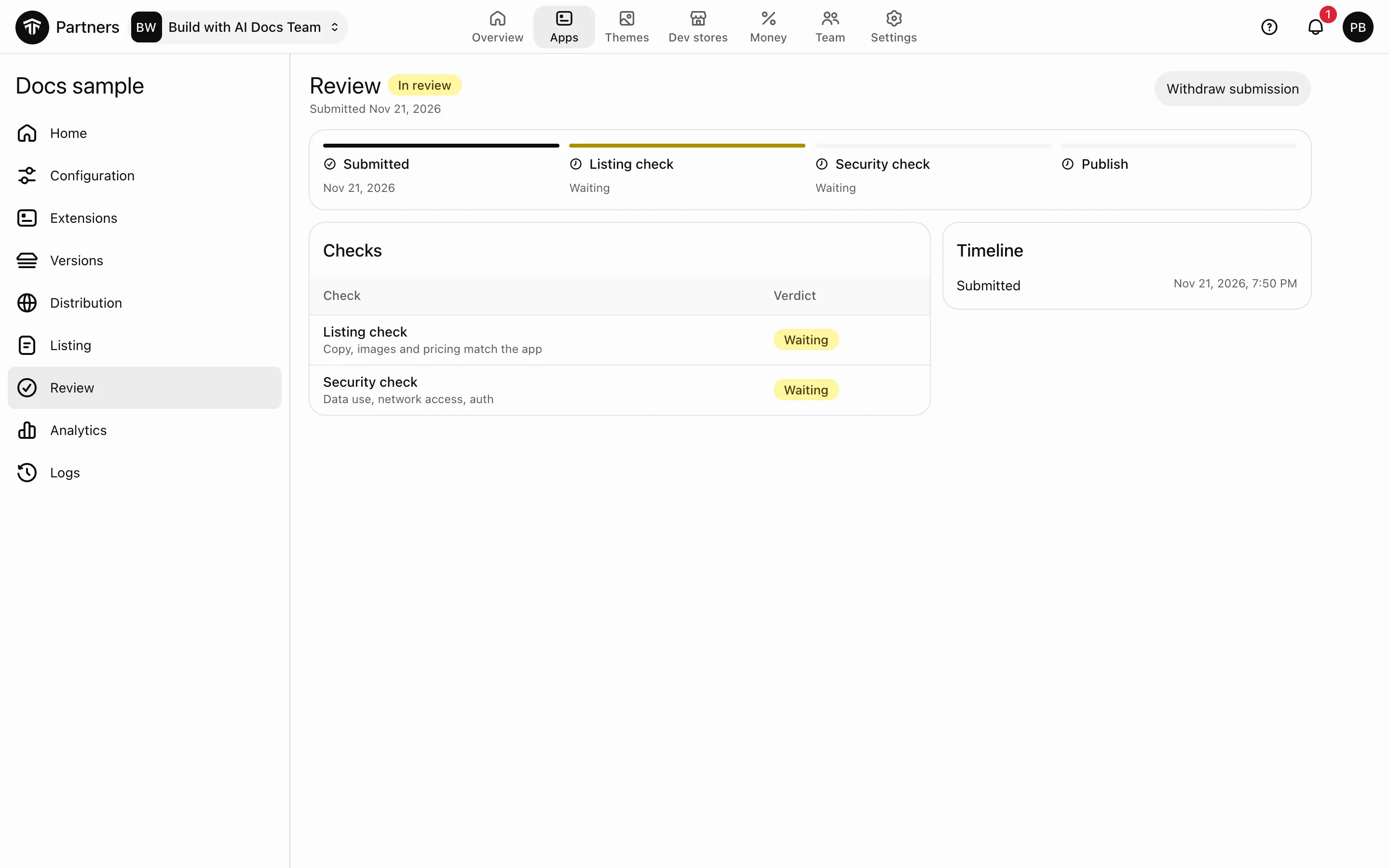
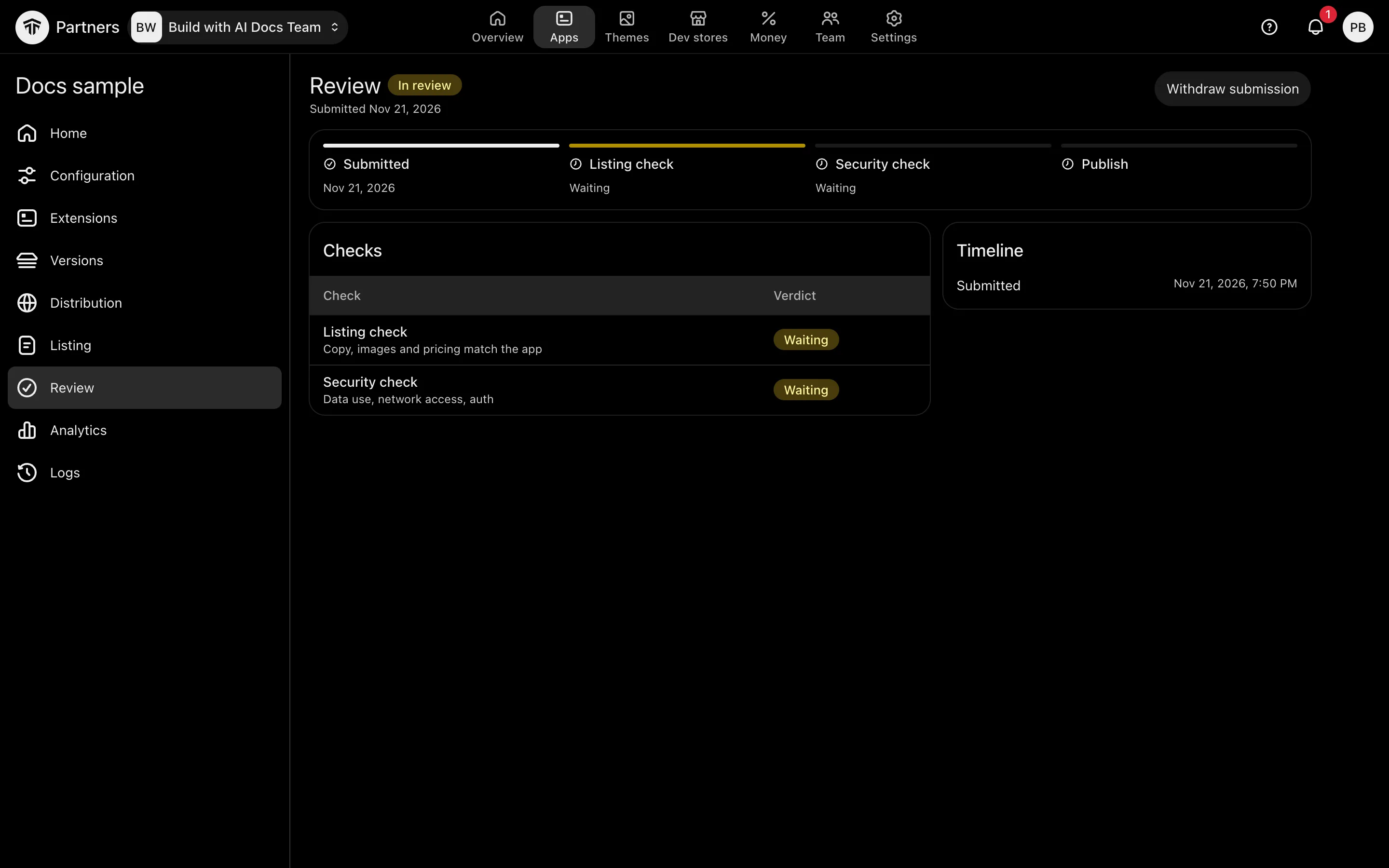
ระหว่างตรวจ แก้ listing ไม่ได้ Withdraw submission ดึงกลับมาได้ รายละเอียดอยู่ในคู่มือ Listing and review
สิ่งที่สร้าง และต้นทุน
| Prompt | 4 (ห้าชุดในรอบที่รันเมื่อ 2026-11-15 ก่อนกล่องจองเป็น app block) |
| เวลาทำงานของ AI | ไม่ถึงครึ่งชั่วโมง |
| โค้ด | 14 ไฟล์ ราว 60 KB ไม่ต้องติดตั้ง package |
| ส่วนของ Tanqory ที่ใช้ | ติดตั้งด้วย OAuth, การแลก token, App Bridge, Admin API, orders/create และ webhook ด้านความเป็นส่วนตัว, app billing, app block, app proxy |
| ค่าใช้จ่ายของร้านค้า | แพ็กเกจที่คุณตั้ง บนร้านทดสอบทุกการเรียกเก็บเป็นการทดสอบ |
ไอเดียสำหรับแอปของคุณเอง: ไอเดียธุรกิจอื่น เมื่อมีอะไรไม่ทำงาน: แก้ปัญหา